
Clear Communication for Motorola Two-Way Radios, Even in High Noise
If you use a Motorola two-way radio in a noisy environment, such as security details, event operations, industrial sites, or outdoor work, a standard speaker mic quickly gets drowned out. The IASUS NT5 throat microphone solves that by picking up your voice directly from vocal cord vibration instead of the air around you. No wind, engine noise, or crowd noise in the way. Just clear transmission.
This page covers which NT5 configuration fits your Motorola radio, how to set it up, and what else you need to get on the air.
Which Throat Mic Works With Motorola Radios?
Motorola uses several different accessory connectors, so the right NT5 depends on your radio:
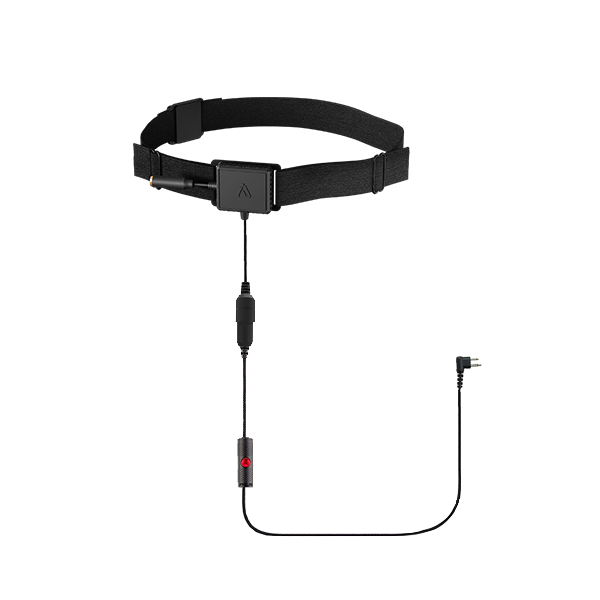
The NT5, Motorola Dual Pin ($197.25) matches professional series portables with the dual pin connector, such as the GP and CP series.

The NT5, Motorola Single Pin ($197.25) matches Talkabout consumer radios and TETRA radios with the single pin connector.
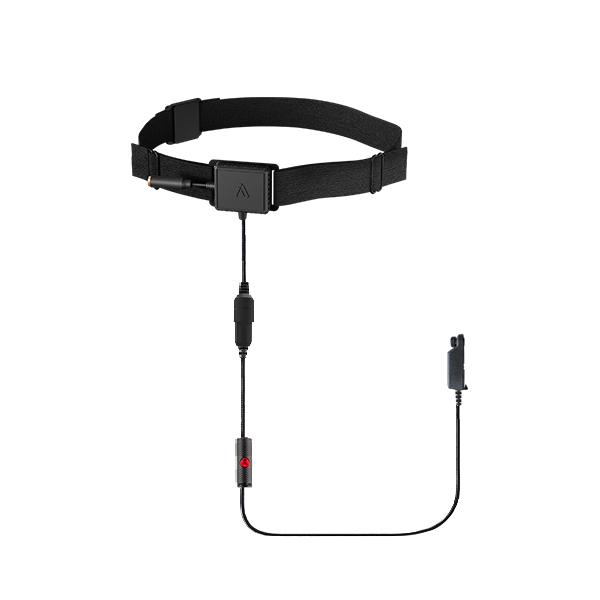
The NT5, Motorola Mototrbo Pin ($225.00) matches Mototrbo digital radios, including the XPR and DP series.
What’s in the box: NT5 throat mic headset, throat strap (fits 13 to 21 inch necks), and the matching Motorola M2 adaptor with button, compatible with wired PTT accessories.
Motorola Radios the NT5 Works With
Motorola radios break into three connector groups. Find yours below:
- Talkabout series (single pin, 2.5mm): MR350, MR351, MR355, T5300, T5420, T5600, T5800, T5950, T6200, T6300, T6500, T6600, T7450, T8500, and more. TETRA radios: MTP850, MTH600, MTH650, MTH800, MTH850.
- Professional series (dual pin): XTN600, GP300, GP308, GP350, CP110, CP150, CP185, CP200, P1225, RDV5100, RDU2080, BPR40, and more.
- Mototrbo digital (Mototrbo pin): DP3400, DP3600, DP4400, DP4600, DP4800, XPR 6350, XPR 6500, XPR 6550, XPR 7350, XPR 7380, XPR 7550, XPR 7580, APX2000, APX6000, APX7000, and more.
Don’t see your model? Check the full Motorola Headset Compatibility page or contact us and we’ll confirm the right setup.
How to Set Up Your NT5 With a Motorola Radio
- Connect the matching adaptor to your radio’s accessory port (dual pin, single pin, or Mototrbo pin).
- Fit the throat strap comfortably around your neck so the transponders sit softly against your skin.
- Position the transducers on your voice box (where vibrations are strongest) and adjust until volume and clarity peak. Placement varies by person.
- Use the inline PTT button to transmit or PTT on the radio. Some Motorola models need the audio accessory mode enabled in the radio menu first.
For more detail, see How to Use a Throat Microphone.
What Else Do You Need?
Each NT5 Motorola configuration ships with everything needed to transmit: strap, matching adaptor, and an inline PTT button. There are optional earpieces you can choose from:
- Acoustic coil Earpiece ($39)
- IA Earbuds ($49)
- Extreme Noise Reduction Earbuds with Custom Earmolds ($99)
- XSound 2.1R Helmet Speakers ($49.95)
- XSound 3 Helmet Speakers ($119)
- XSound 4 Helmet Speakers ($159)
And add an optional extended Finger PTT ($25)
If your team uses push-to-talk apps like Zello or ESChat instead of radios, see our BLE Wireless PTT for PoC setups.
FAQ
Will this throat mic work with my Motorola Talkabout T5600?
Yes. The Talkabout series uses the single pin connector, so the NT5 Motorola Single Pin plugs straight in. Please check your unit though to confirm.
Which NT5 do I need for my XPR 7550?
The XPR 7550 is a Mototrbo digital radio, so it uses the NT5 Motorola Mototrbo Pin.
Do I need anything else to use it?
No. The NT5 ships with the strap, matching adaptor, and inline PTT button. Add an acoustic coil earpiece, earbuds or helmet speakers if you need to hear incoming audio.
Shop Other Radio Brands
Using a different radio? See the throat mic guide for your brand:
Still Not Sure Which Motorola Setup You Need?
Check the full Motorola Headset Compatibility page, or contact us and we’ll confirm the right configuration before you order.